Linuxのアプリ配布を変えるsnapとは?実際に試して見えた特徴と注意点
snapを実際に試して見えた、配布形式としての特徴や使う際の注意点を紹介します。


0. はじめに
こうした課題に対する仕組みのひとつが、Canonical Ltd.が開発している snap です。
目次
1. snapの基本情報
1.1 snapとは?
snap は、Linux でアプリを配布・インストールするためパッケージ形式のひとつです。
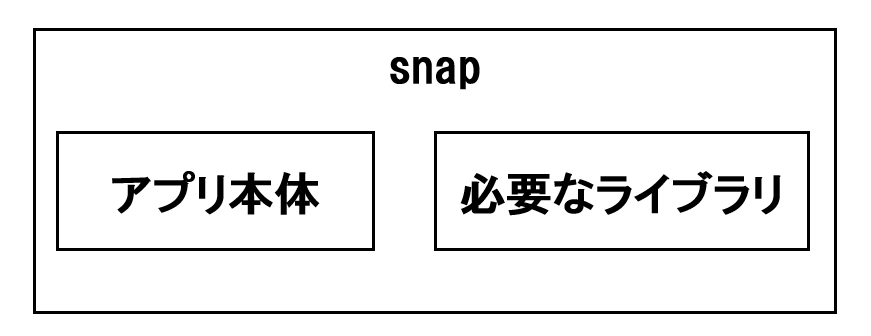
アプリ本体に加えて、必要なライブラリや関連ファイルもまとめて配布できる、自己完結型のパッケージ管理方式です。
1.2 debパッケージとの違い
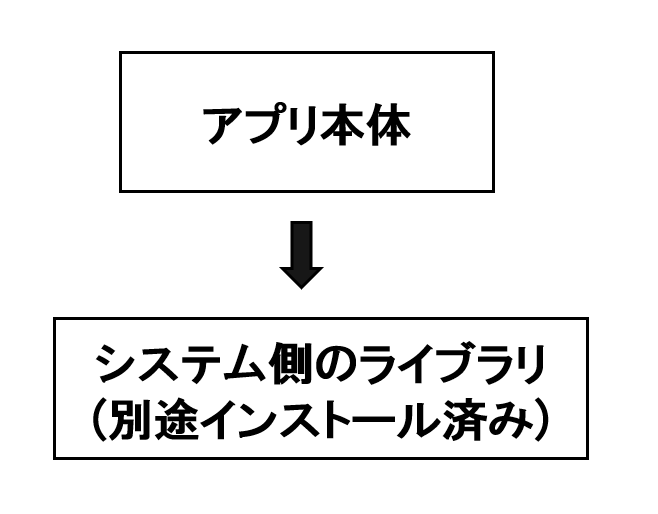
Ubuntuでこれまで標準的に利用されてきたdepパッケージは、システムにインストールされているライブラリを前提に動作します。これはRed Hat系Linuxで利用されるrpmパッケージも同様です。
一方、snap はアプリと必要なライブラリをひとまとめにして持つ、自己完結型のパッケージです。
そのため、snap のほうが依存関係の影響を受けにくいという特徴があります。
1.3 snap使用のメリット
1. 配布しやすい
2. 依存関係の衝突が起きにくい
3. ロールバックしやすい
4. 開発者側の管理がしやすい
1.4 snap使用のデメリット
1. 容量を多く使い、起動が遅くなることがある
2. 自動更新が行われる
3. 一部のアプリで制約を感じることがある
2. snap実践
2.1 環境
- Ubuntu 24.04.3 LTS
2.2 事前準備
以下のコマンドを実行します。
$ snap version
snap    2.66.1+24.04
snapd   2.66.1+24.04
series  16
ubuntu  24.04
kernel  6.6.87.2-microsoft-standard-WSL2
$ sudo apt update
$ sudo apt install snapd
2.3 snapパッケージのインストール実践
2.3.1 Visual Studio Code のインストール
$ sudo snap install code
error: This revision of snap "code" was published using classic confinement and thus may perform
arbitrary system changes outside of the security sandbox that snaps are usually confined to,
which may put your system at risk.
If you understand and want to proceed repeat the command including --classic.
code は classic に分類されているため、通常のインストールではなく --classic を付ける必要があります。
この点については、後述します。
2.3.2 Thunderbird のインストール
一旦パッケージを変更し、以下コマンドで「Thunderbird」のインストールを試みます。
「Thunderbird」のパッケージ名は「thunderbird」です。
$ sudo snap install thunderbird
thunderbird 154.0-2 from Canonical✓ installed
2.3.3 確認
$ snap list
Name                  Version                         Rev    Tracking       Publisher   Notes
bare                  1.0                             5      latest/stable  canonical✓  base
core24                20260410                        1643   latest/stable  canonical✓  base
gnome-46-2404         0+git.b31ceab-sdk0+git.f0723a0  164    latest/stable  canonical✓  -
gnome-system-monitor  48.1                            193    latest/stable  canonical✓  -
gtk-common-themes     0.1-81-g442e511                 1535   latest/stable  canonical✓  -
mesa-2404             25.2.8-snap288                  1839   latest/stable  canonical✓  -
snapd                 2.76.2                          27710  latest/stable  canonical✓  snapd
thunderbird           154.0-2                         1228   latest/stable  canonical✓  -
2.3.4 起動してみる
$ snap run thunderbird
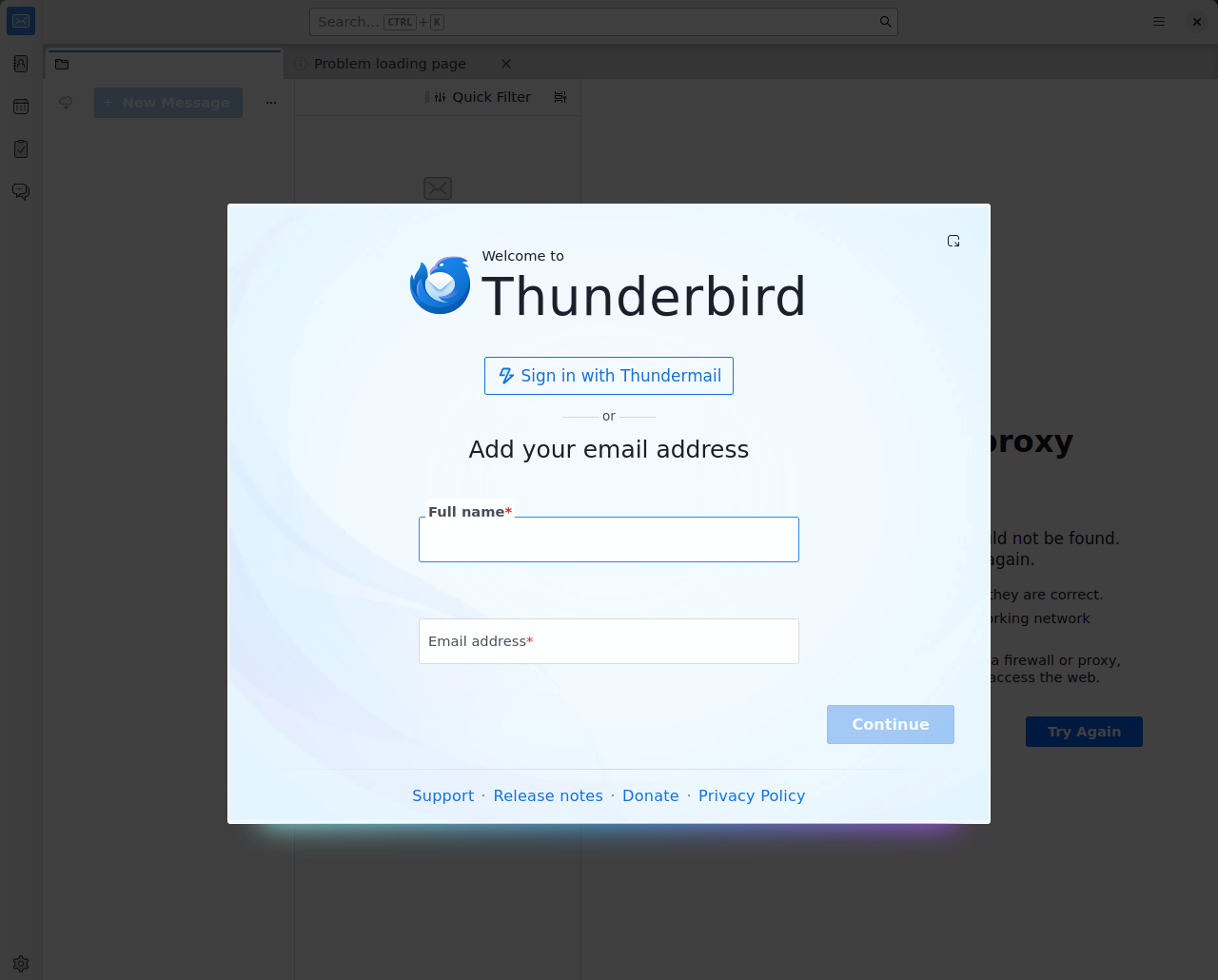 問題なく起動できることを確認します。
2.3.5 snapの内容確認
$ snap list
Name               Version                         Rev    Tracking       Publisher   Notes
bare               1.0                             5      latest/stable  canonical✓  base
core24             20260410                        1643   latest/stable  canonical✓  base
gnome-46-2404      0+git.b31ceab-sdk0+git.f0723a0  164    latest/stable  canonical✓  -
gtk-common-themes  0.1-81-g442e511                 1535   latest/stable  canonical✓  -
mesa-2404          25.2.8-snap288                  1839   latest/stable  canonical✓  -
snapd              2.76.2                          27710  latest/stable  canonical✓  snapd
thunderbird        154.0-2                         1228   latest/stable  canonical✓  -
$ ls
bin  data-dir  etc  gnome-platform  gpu-2404  gpu-2404-2  meta  patch-default-profile.py  snap  thunderbird.launcher  usr
$ ls
libICE.so.6        libcurl.so.4            libgpgme.so.11.27.0  liblz4.so.1.9.4        libsasl2.so.2       libz.so.1
libICE.so.6.3.0    libcurl.so.4.8.0        libksba.so.8         liblzma.so.5           libsasl2.so.2.0.25  libz.so.1.3
libSM.so.6         libgcrypt.so.20         libksba.so.8.14.6    liblzma.so.5.4.5       libssh.so.4         opensc-pkcs11.so
libSM.so.6.0.1     libgcrypt.so.20.4.3     liblber.so.2         libnghttp2.so.14       libssh.so.4.9.6     pkcs11
libXt.so.6         libgpg-error.so.0       liblber.so.2.0.200   libnghttp2.so.14.26.0  libudev.so.1        sasl2
libXt.so.6.0.0     libgpg-error.so.0.34.0  libldap.so.2         libpsl.so.5            libudev.so.1.7.8
libblkid.so.1      libgpgme-pthread.so.11  libldap.so.2.0.200   libpsl.so.5.3.4        libuuid.so.1
libblkid.so.1.1.0  libgpgme.so.11          liblz4.so.1          librtmp.so.1           libuuid.so.1.3.0
このことから、snap の中にアプリの動作に必要な要素がひと通り収まっていることが確認できました。
2.3.6 アンインストール
以下のコマンドでアンインストールします。
$ sudo snap remove thunderbird
5秒ほど待つと以下が出力され、アンインストールされました。
thunderbird removed (snap data snapshot saved)
以下で確認します。
$ snap list
Name                  Version                         Rev    Tracking       Publisher   Notes
bare                  1.0                             5      latest/stable  canonical✓  base
core24                20260410                        1643   latest/stable  canonical✓  base
gnome-46-2404         0+git.b31ceab-sdk0+git.f0723a0  164    latest/stable  canonical✓  -
gtk-common-themes     0.1-81-g442e511                 1535   latest/stable  canonical✓  -
mesa-2404             25.2.8-snap288                  1839   latest/stable  canonical✓  -
snapd                 2.76.2                          27710  latest/stable  canonical✓  snapd
先ほどあったthunderbirdが消えていることが確認できます。
2.4 制限レベルについて
ここで、先ほど 3.3.1にてcode のインストール時に出たエラーをもう少し見てみます。
error: This revision of snap "code" was published using classic confinement and thus may perform
arbitrary system changes outside of the security sandbox that snaps are usually confined to,
which may put your system at risk.
If you understand and want to proceed repeat the command including --classic.
このエラーは、snap に設定されている confinement(制限レベル) によるものです。
2.4.1 confinement(制限レベル)とは?
通常の snap は、サンドボックスの中で動作するように制限されています。
そのため、OS 全体への影響を抑えやすい一方で、アプリによっては十分なアクセス権が必要になる場合があります。
snap では、こうした動作範囲の違いを confinement という仕組みで管理しています。
これは、アプリがファイルやネットワーク、周辺機器、サービスなどへアクセスできる範囲を定める仕組みであり、システム全体や他のアプリへの影響を抑えるための防波堤のような役割を果たします。
2.4.2 制限レベルの分類
制限レベルはシステムへの影響度に合わせて3種類あります。
-
Strict・ほぼ完全に隔離された状態で動作し、基本的には安全性を重視した最小限のアクセスに制限される。・特別な引数なしでインストール可能。
-
Classic・従来のパッケージに近い形で、システム資源へ広くアクセス可能。・インストール時には`--classic`が必要
-
Devmode・strict に近い制限がありつつ、デバッグや未許可の interface の確認のためにシステムへフルアクセス可能。・インストールには`--devmode`が必要。
2.4.3 制限レベル確認方法
snap info --verbose <snap名>
$ snap info --verbose code
name:      code
summary:   Code editing. Redefined.
publisher: Visual Studio Code (vscode✓)
store-url: https://snapcraft.io/code
contact:   https://twitter.com/code
links:
contact:
- https://twitter.com/code
website:
- https://code.visualstudio.com/
license: Proprietary
description: |
Visual Studio Code is a new choice of tool that combines the
simplicity of a code editor with what developers need for the core
edit-build-debug cycle.
notes:
private:     false
confinement: classic
base:    core20
snap-id: Ht0aUHi7ofh9Fbwh6m7jUN2pAy6kzBiu
channels:
latest/stable:    110a328e 2026-08-19 (258) 545MB classic
latest/candidate: ↑
latest/beta:      ↑
latest/edge:      ↑
confinement: の部分が classic になっており、これが制限レベルを表しています。
一方、問題なくインストールできた Thunderbird を確認すると、以下のようになります。
$ snap info --verbose thunderbird
name:      thunderbird
================ 省略 ================
notes:
private:     false
confinement: strict
3. その他
3.1 役立つコマンド一覧
| コマンド | 説明 |
|
snap version
|
snapのバージョン確認
|
|
snap list
|
インストール済み一覧表示
|
|
snap info --verbose <snap名>
|
confinement など詳細確認
|
|
sudo snap install <snap名>
|
インストール
|
| sudo snap install <snap名> --classic |
classic confinementのアプリをインストール
|
|
snap run <snap名>
|
アプリ起動
|
|
sudo snap remove <snap名>
|
アンインストール
|
|
snap refresh
|
snapパッケージ更新
|
|
snap refresh --list
|
更新可能なパッケージ一覧
|
|
readlink -f /snap/bin/<snap名>
|
実体パス確認
|
3.2 snapパッケージ一覧
4. 最後に



NTTテクノクロス株式会社
IOWNクロスバリュー事業部
第四ビジネスユニット