ファジングテスト入門 第2回 ~ファジングテストツールの構築と実行~
今回はネットワークファジングツールについて動作イメージの一例をご紹介いたします。


テクノロジーコラム
- 2026年07月23日公開
はじめに
こんにちは, NTTテクノクロス株式会社の村木と申します。
本連載ではソフトウェアテストの手法の1つであるファジングテストに関する内容をご紹介したいと思います。
また, ファジングテストに関する概要は過去の連載記事をご確認ください。
・ファジングテスト入門 第1回 ~ファジングテストの概要と必要性~
今回はネットワークファジングツールについて動作イメージの一例をご紹介したいと思います。
○目次

ネットワークファジングツール「Boofuzz」の概要
「Boofuzz」は「OpenRCE/sulley: A pure-python fully automated and unattended fuzzing framework.」というツールの後継ツールとして開発されています。
PythonベースのOSSツールで, Pythonコードで通信メッセージの構造を記述し, 異常なデータを挿入・送信してシステムをテストします。
本ツールは通信メッセージの構造を自前で定義する必要があるため, ファジング対象のプロトコル仕様を事前に習熟している必要があります。
概要は以下の通りです。
| # | 概要 |
|---|---|
| ライセンス | GNU General Public License v2.0 |
| 対応プロトコル | FTP, HTTP, TCP, UDP, SSL |
| 変異データの生成 | 実行スクリプト内で定義されたプトロコル形式(構造)を元に変異(ミューテーション)する |
| 対応OS | ・Ubuntu/Debian ・OpenSuse ・CentOS |
| 対応言語 | ・実行スクリプトはPython |
| 特徴 | ・Python言語を通じてプロトコルの形式を記述する ・Pythonライブラリとしてインストールされる ・ライブラリ内のAPIを使用したファジングの実行スクリプトを作成する必要がある ・ライブラリ内のAPIで実行する変異パターンを指定(有効/無効)できる ・文字列や数値, バイトに対してサイズ変更/繰り返し/置換/除外を行う ・各実行のログ結果が.dbファイル(SQLiteデータベース)として出力されるため, SQLのViwerなどで問題が発生したテストケースを確認する |
「Boofuzz」の構築手順例
○前提条件
- ・OS:Ubuntu 18.04(ベアメタル/VMは問わない)
- ・テスト対象:live555
- ※Proxy設定については記述しない, 必要に応じて事前に環境変数/pip/Gitに対してProxy設定を実施すること。
○構築イメージ
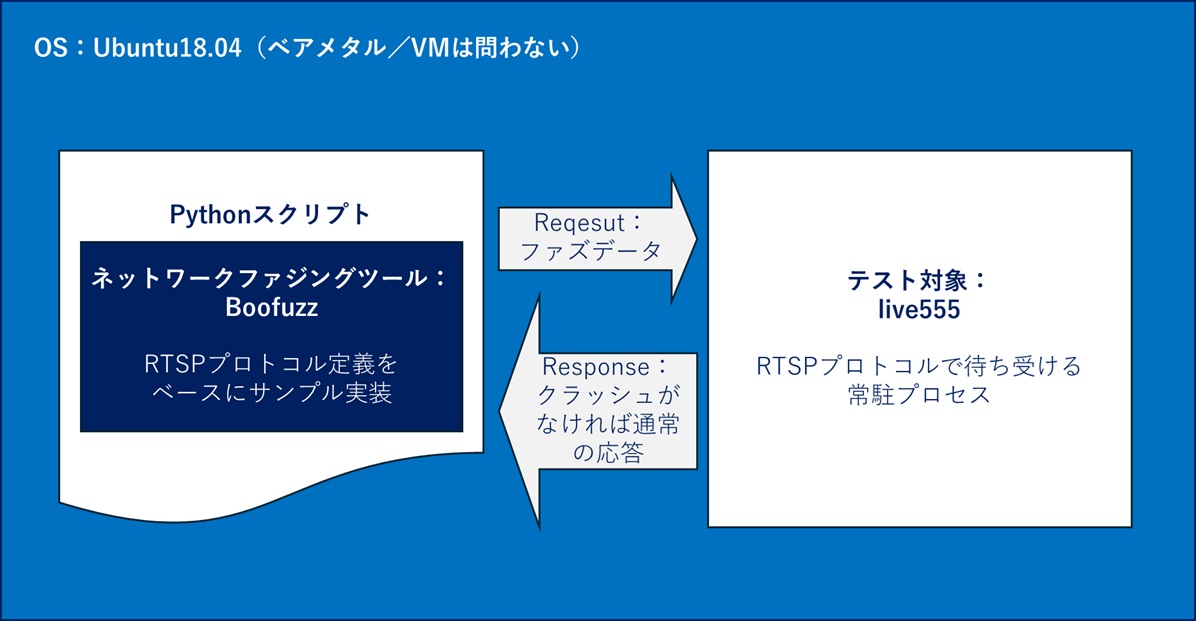
○事前手順
以下のInstall。
- ・git:分散型バージョン管理システム「Git」を操作するためのツール
- ・python3-pip:Pythonのパッケージ管理ツール
- ・python3-venv:Pythonの仮想環境を作成するためのツール
- ・build-essential:C/C++コンパイラやその他の開発ツールを含むパッケージ
$ sudo apt install -y git python3-pip python3-venv build-essential- ・sqlite3:軽量なRDBMS
$ sudo apt install -y sqlite3作業ディレクトリ作成し移動する。
$ cd ~

$ mkdir boofuzz && cd boofuzz
Boofuzz動作用のPython仮想環境を作成する。
$ python3 -m venv env

$ source env/bin/activate
(env) $
○Boofuzzのインストール
以下のInstall。
- ・setuptools:Pythonプログラムのパッケージ化やライブラリの依存関係を管理するためのツール
- ・boofuzz:今回ご紹介するネットワークファジングツール
(env) $ pip install -U pip setuptools
 ⋮
Successfully installed pip-x.x.x setuptools-x.x.x
(env) $ pip install boofuzz
 ⋮
Successfully installed Flask-x.x.x Jinja2-x.x.x MarkupSafe-x.x.x Werkzeug-x.x.x attrs-x.x.x boofuzz-x.x.x click-x.x.x colorama-x.x.x dataclasses-x.x funcy-x.x future-x.x.x importlib-metadata-x.x.x itsdangerous-x.x.x psutil-x.x.x pydot-x.x.x pyparsing-x.x.x pyserial-x.x six-x.x.x tornado-x.x typing-extensions-x.x.x zipp-x.x.x
○テスト対象「live555」の構築
ディレクトリ移動。
$ cd ~live555のクローンとコンパイル。
$ git clone https://github.com/rgaufman/live555.git
Cloning into 'live555'...
remote: Enumerating objects: 5931, done.
remote: Counting objects: 100% (3826/3826), done.
remote: Compressing objects: 100% (694/694), done.
remote: Total 5931 (delta 3366), reused 3146 (delta 3132), pack-reused 2105 (from 2)
Receiving objects: 100% (5931/5931), 10.43 MiB | 12.47 MiB/s, done.
Resolving deltas: 100% (5011/5011), done.
$ cd live555
$ git checkout ceeb4f4
Note: checking out 'ceeb4f4'.
You are in 'detached HEAD' state. You can look around, make experimental
changes and commit them, and you can discard any commits you make in this
state without impacting any branches by performing another checkout.
If you want to create a new branch to retain commits you create, you may
do so (now or later) by using -b with the checkout command again. Example:
git checkout -b <new-branch-name>
HEAD is now at ceeb4f4 Bump to version 2018.08.28
# コンパイルエラー対処のため環境変数設定
$ export LDFLAGS="-no-pie"$ ./genMakefiles linux$ make clean all
⋮
For more information about this source code (including your obligations under the LGPL), please see our FAQ at http://live555.com/liveMedia/faq.html# コンパイル結果の実行ファイル存在確認
$ ls ./testProgs/testOnDemandRTSPServer
./testProgs/testOnDemandRTSPServer# コンパイルエラー対処のため環境変数削除
$ export -n LDFLAGS○fuzzerプログラムのサンプルコードを作成
ディレクトリ移動。
$ cd ~/boofuzzファイル作成と編集。
※ファイル名は任意
$ vi fuzzer_mon_live555_RTSP.py以下サンプルコード例。
#!/usr/bin/env python3
from boofuzz import *

def main():
    # 接続情報の変数定義
    target_ip = "127.0.0.1"
    target_port = 8554

    # --- Process Monitor の設定 ---
    procmon = ProcessMonitor(
        host=target_ip,           # process_monitorが動いているIP(今回はローカル)
        port=26002,               # process_monitorのデフォルトポート
    )

    procmon.set_options(
        proc_name="testOnDemandRTSPServer",
        # 環境にあわせてテスト対象のフルパスを指定する
        start_commands=["/home/ntt/live555/testProgs/testOnDemandRTSPServer 8554"]
    )

    # セッションとターゲットの設定
    session = Session(
        target=Target(
            connection=TCPSocketConnection(target_ip, target_port),
            monitors=[procmon]    # モニターを登録
        ),
        # クラッシュ検知後ターゲットが再起動してポートを開くまでの待機時間(秒)
        restart_sleep_time=2,
    )

    # RTSPリクエストの定義
    s_initialize(name="RTSP_Request")

    # リクエストライン
    with s_block("Request-Line"):
        s_group("Method", values=["OPTIONS", "DESCRIBE", "SETUP", "PLAY", "TEARDOWN", "INVALID"])
        s_delim(" ", name="space-1")

        s_string("rtsp://", name="uri_prefix")
        s_string(target_ip, name="uri_ip")
        s_delim(":", name="colon")
        s_string(str(target_port), name="uri_port")
        s_string("/stream", name="uri_path")
        s_delim(" ", name="space-2")

        s_static("RTSP/1.0", name="Version")
        s_static("\r\n", name="crlf-1")

    # ヘッダー
    with s_block("Headers"):
        s_static("CSeq: ", name="cseq_header")
        s_string("1", name="cseq_value")
        s_static("\r\n", name="crlf-2")

        s_static("User-Agent: ", name="ua_header")
        s_string("Boofuzz-Tester", name="ua_value")
        s_static("\r\n", name="crlf-3")

        s_static("Accept: ", name="accept_header")
        s_string("application/sdp", name="accept_value")
        s_static("\r\n", name="crlf-4")

    # ヘッダーの終了を示す空行
    s_static("\r\n", name="crlf-end")

    # セッションにリクエストを接続
    session.connect(s_get("RTSP_Request"))

    # ファジングの開始
    print(f"[*] Starting fuzzing against {target_ip}:{target_port} with Process Monitor")
    session.fuzz()

if __name__ == "__main__":
    main()
○「process_monitor」の準備
「Boofuzz」ではprocess_monitorを用いてテスト対象プロセスを監視してCrashの検出を行います。
process_monitorを用いるため「Boofuzz」Gitプロジェクトをクローンします。
ディレクトリ移動し「Boofuzz」Gitプロジェクトをクローン。
※下例では「/var/tmp」ディレクトリに「Boofuzz」Gitプロジェクトをクローンする。
$ cd /var/tmp

$ git clone https://github.com/jtpereyda/boofuzz.git
「Boofuzz」の実行と結果確認例
続いて作成した「Boofuzz」環境とサンプルコードを用いたファジング実行と結果確認手順の一例をご紹介いたします。
○テスト対象「live555」の実行
# ディレクトリ移動
$ cd ~/live555/testProgs
# 実行
$ ./testOnDemandRTSPServer 8555

"mpeg4ESVideoTest" stream, from the file "test.m4e"
Play this stream using the URL "rtsp://172.19.116.166:8554/mpeg4ESVideoTest"

"h264ESVideoTest" stream, from the file "test.264"
Play this stream using the URL "rtsp://172.19.116.166:8554/h264ESVideoTest"

"h265ESVideoTest" stream, from the file "test.265"
Play this stream using the URL "rtsp://172.19.116.166:8554/h265ESVideoTest"

"mpeg1or2AudioVideoTest" stream, from the file "test.mpg"
Play this stream using the URL "rtsp://172.19.116.166:8554/mpeg1or2AudioVideoTest"

"mpeg1or2ESVideoTest" stream, from the file "testv.mpg"
Play this stream using the URL "rtsp://172.19.116.166:8554/mpeg1or2ESVideoTest"

"mp3AudioTest" stream, from the file "test.mp3"
Play this stream using the URL "rtsp://172.19.116.166:8554/mp3AudioTest"

"wavAudioTest" stream, from the file "test.wav"
Play this stream using the URL "rtsp://172.19.116.166:8554/wavAudioTest"

"amrAudioTest" stream, from the file "test.amr"
Play this stream using the URL "rtsp://172.19.116.166:8554/amrAudioTest"

"vobTest" stream, from the file "test.vob"
Play this stream using the URL "rtsp://172.19.116.166:8554/vobTest"

"mpeg2TransportStreamTest" stream, from the file "test.ts"
Play this stream using the URL "rtsp://172.19.116.166:8554/mpeg2TransportStreamTest"

"aacAudioTest" stream, from the file "test.aac"
Play this stream using the URL "rtsp://172.19.116.166:8554/aacAudioTest"

"dvVideoTest" stream, from the file "test.dv"
Play this stream using the URL "rtsp://172.19.116.166:8554/dvVideoTest"

"ac3AudioTest" stream, from the file "test.ac3"
Play this stream using the URL "rtsp://172.19.116.166:8554/ac3AudioTest"

"matroskaFileTest" stream, from the file "test.mkv"
Play this stream using the URL "rtsp://172.19.116.166:8554/matroskaFileTest"

"webmFileTest" stream, from the file "test.webm"
Play this stream using the URL "rtsp://172.19.116.166:8554/webmFileTest"

"oggFileTest" stream, from the file "test.ogg"
Play this stream using the URL "rtsp://172.19.116.166:8554/oggFileTest"

"opusFileTest" stream, from the file "test.opus"
Play this stream using the URL "rtsp://172.19.116.166:8554/opusFileTest"

"mpeg2TransportStreamFromUDPSourceTest" stream, from a UDP Transport Stream input source
(IP multicast address 239.255.42.42, port 1234)
Play this stream using the URL "rtsp://172.19.116.166:8554/mpeg2TransportStreamFromUDPSourceTest"

(We use port 8000 for optional RTSP-over-HTTP tunneling.)
○process_monitorの実行
※「live555」は標準出力を掴むため別terminalを開くこと。
ディレクトリ移動し, Boofuzz用のPython仮想環境を読み込み, process_monitorを実行する。
$ cd /var/tmp/boofuzz

$ source ~/boofuzz/env/bin/activate

$ (env) ntt@Ubuntu-VM:/var/tmp/boofuzz$ python ./process_monitor.py -p "testOnDemandRTSPServer"
[05:09.41] Process Monitor PED-RPC server initialized:
[05:09.41]       listening on:  0.0.0.0:26002
[05:09.41]       crash file:    /var/tmp/boofuzz/boofuzz-crash-bin
[05:09.41]       # records:     0
[05:09.41]       proc name:     testOnDemandRTSPServer
[05:09.41]       log level:     1
[05:09.41] awaiting requests...
○ファジング実行
※「process_monitor」は標準出力を掴むため再度別terminalを開くこと。
Boofuzz用のPython仮想環境を読み込む。
$ source ~/boofuzz/env/bin/activate「Boofuzz」サンプルコード実行
# ディレクトリ移動
$ cd ~/boofuzz

# ファザー実行
(env) $ python3 ./fuzzer_mon_live555_RTSP.py
[2026-04-08 17:53:17,922]     Info: Web interface can be found at http://localhost:26000
[*] Starting fuzzing against 127.0.0.1:8554 with Process Monitor
[2026-04-08 17:53:19,952] Test Case: 1: RTSP_Request:[RTSP_Request.Request-Line.Method:0]
[2026-04-08 17:53:19,953]     Info: Type: Group
[2026-04-08 17:53:19,953]     Info: Opening target connection (127.0.0.1:8554)...
[2026-04-08 17:53:19,953]     Info: Connection opened.
[2026-04-08 17:53:19,953]   Test Step: Monitor ProcessMonitor#140137471787248[127.0.0.1:26002].pre_send()
[2026-04-08 17:53:19,954]   Test Step: Monitor CallbackMonitor#140137364701648[pre=[],post=[],restart=[],post_start_target=[]].pre_send()
[2026-04-08 17:53:19,954]   Test Step: Fuzzing Node 'RTSP_Request'
[2026-04-08 17:53:19,954]     Info: Sending 112 bytes...
[2026-04-08 17:53:19,954]     Transmitted 112 bytes: 44 45 53 43 52 49 42 45 20 72 74 73 70 3a 2f 2f 31 32 37 2e 30 2e 30 2e 31 3a 38 35 35 34 2f 73 74 72 65 61 6d 20 52 54 53 50 2f 31 2e 30 0d 0a 43 53 65 71 3a 20 31 0d 0a 55 73 65 72 2d 41 67 65 6e 74 3a 20 42 6f 6f 66 75 7a 7a 2d 54 65 73 74 65 72 0d 0a 41 63 63 65 70 74 3a 20 61 70 70 6c 69 63 61 74 69 6f 6e 2f 73 64 70 0d 0a 0d 0a b'DESCRIBE rtsp://127.0.0.1:8554/stream RTSP/1.0\r\nCSeq: 1\r\nUser-Agent: Boofuzz-Tester\r\nAccept: application/sdp\r\n\r\n'
[2026-04-08 17:53:19,954]   Test Step: Contact target monitors
[2026-04-08 17:53:19,955]   Test Step: Cleaning up connections from callbacks
[2026-04-08 17:53:19,955]       Check OK: No crash detected.
[2026-04-08 17:53:19,955]     Info: Closing target connection...
[2026-04-08 17:53:19,955]     Info: Connection closed.
[2026-04-08 17:53:19,961] Test Case: 2: RTSP_Request:[RTSP_Request.Request-Line.Method:1]
[2026-04-08 17:53:19,961]     Info: Type: Group
[2026-04-08 17:53:19,961]     Info: Opening target connection (127.0.0.1:8554)...
[2026-04-08 17:53:19,961]     Info: Connection opened.
[2026-04-08 17:53:19,961]   Test Step: Monitor ProcessMonitor#140137471787248[127.0.0.1:26002].pre_send()
[2026-04-08 17:53:19,961]   Test Step: Monitor CallbackMonitor#140137364701648[pre=[],post=[],restart=[],post_start_target=[]].pre_send()
[2026-04-08 17:53:19,961]   Test Step: Fuzzing Node 'RTSP_Request'
[2026-04-08 17:53:19,961]     Info: Sending 109 bytes...
[2026-04-08 17:53:19,961]     Transmitted 109 bytes: 53 45 54 55 50 20 72 74 73 70 3a 2f 2f 31 32 37 2e 30 2e 30 2e 31 3a 38 35 35 34 2f 73 74 72 65 61 6d 20 52 54 53 50 2f 31 2e 30 0d 0a 43 53 65 71 3a 20 31 0d 0a 55 73 65 72 2d 41 67 65 6e 74 3a 20 42 6f 6f 66 75 7a 7a 2d 54 65 73 74 65 72 0d 0a 41 63 63 65 70 74 3a 20 61 70 70 6c 69 63 61 74 69 6f 6e 2f 73 64 70 0d 0a 0d 0a b'SETUP rtsp://127.0.0.1:8554/stream RTSP/1.0\r\nCSeq: 1\r\nUser-Agent: Boofuzz-Tester\r\nAccept: application/sdp\r\n\r\n'
[2026-04-08 17:53:19,961]   Test Step: Contact target monitors
[2026-04-08 17:53:19,962]   Test Step: Cleaning up connections from callbacks
[2026-04-08 17:53:19,962]       Check OK: No crash detected.
[2026-04-08 17:53:19,962]     Info: Closing target connection...
[2026-04-08 17:53:19,962]     Info: Connection closed.
[2026-04-08 17:53:19,964] Test Case: 3: RTSP_Request:[RTSP_Request.Request-Line.Method:2]
[2026-04-08 17:53:19,964]     Info: Type: Group
[2026-04-08 17:53:19,964]     Info: Opening target connection (127.0.0.1:8554)...
[2026-04-08 17:53:19,964]     Info: Connection opened.
[2026-04-08 17:53:19,964]   Test Step: Monitor ProcessMonitor#140137471787248[127.0.0.1:26002].pre_send()
[2026-04-08 17:53:19,965]   Test Step: Monitor CallbackMonitor#140137364701648[pre=[],post=[],restart=[],post_start_target=[]].pre_send()
[2026-04-08 17:53:19,965]   Test Step: Fuzzing Node 'RTSP_Request'
[2026-04-08 17:53:19,965]     Info: Sending 108 bytes...
[2026-04-08 17:53:19,965]     Transmitted 108 bytes: 50 4c 41 59 20 72 74 73 70 3a 2f 2f 31 32 37 2e 30 2e 30 2e 31 3a 38 35 35 34 2f 73 74 72 65 61 6d 20 52 54 53 50 2f 31 2e 30 0d 0a 43 53 65 71 3a 20 31 0d 0a 55 73 65 72 2d 41 67 65 6e 74 3a 20 42 6f 6f 66 75 7a 7a 2d 54 65 73 74 65 72 0d 0a 41 63 63 65 70 74 3a 20 61 70 70 6c 69 63 61 74 69 6f 6e 2f 73 64 70 0d 0a 0d 0a b'PLAY rtsp://127.0.0.1:8554/stream RTSP/1.0\r\nCSeq: 1\r\nUser-Agent: Boofuzz-Tester\r\nAccept: application/sdp\r\n\r\n'
 ⋮
○結果確認
実行すると「boofuzz-resultsディレクトリ」(自動生成される)に「run-2025-01-09T04-47-10.db」のようなデータが生成されます。
SQLiteを用いて該当のデータベースにアクセスすることで, データベース内を検索し結果を確認することができます。
SQLiteのインタラクティブシェルを開く。
$ ls ./boofuzz-results/
run-2026-04-07T09-57-39.db

$ sqlite3 run-2026-04-07T09-57-39.db
SQLite version 3.22.0 2018-01-22 18:45:57
Enter ".help" for usage hints.
データベース内のテーブル一覧を確認する。
BooFuzzのデータベースには通常, sessions/cases/crashesなどのテーブルが含まれている。
※Crashesは検出されていない場合, テーブル自体が存在しない。
sqlite> .tables
cases  steps
特定のテーブルの構造(スキーマ)を確認する。
送信したデータ(テストケース)が登録されるcasesテーブルのスキーマを確認する場合は以下。
casesテーブルのカラム名とデータ型が表示される。
sqlite> .schema cases
CREATE TABLE cases (name text, number integer, timestamp TEXT);
SELECT文でデータ検索, 取得する。
casesテーブルからすべてのデータを取得する場合は以下。
sqlite> SELECT * FROM cases;
RTSP_Request:[RTSP_Request.Request-Line.Method:0]|1|[2026-04-08 17:53:19,952]
RTSP_Request:[RTSP_Request.Request-Line.Method:1]|2|[2026-04-08 17:53:19,961]
RTSP_Request:[RTSP_Request.Request-Line.Method:2]|3|[2026-04-08 17:53:19,964]
RTSP_Request:[RTSP_Request.Request-Line.Method:3]|4|[2026-04-08 17:53:19,968]
RTSP_Request:[RTSP_Request.Request-Line.Method:4]|5|[2026-04-08 17:53:19,972]
RTSP_Request:[RTSP_Request.Request-Line.space-1:0]|6|[2026-04-08 17:53:19,976]
RTSP_Request:[RTSP_Request.Request-Line.space-1:1]|7|[2026-04-08 17:53:19,980]
RTSP_Request:[RTSP_Request.Request-Line.space-1:2]|8|[2026-04-08 17:53:19,984]
RTSP_Request:[RTSP_Request.Request-Line.space-1:3]|9|[2026-04-08 17:53:19,988]
 ⋮
クラッシュが発生したテストケースを確認するには, crashesテーブルを検索する。
すべてのクラッシュ情報を取得する場合は以下。
sqlite> SELECT * FROM crashes;特定のクラッシュIDに関する詳細を確認する場合は以下。
sqlite> SELECT * FROM crashes WHERE id = 1;特定のセッションIDに関連するテストケースを取得する場合は以下。
sqlite> SELECT * FROM cases WHERE session_id = 1;SQLiteシェルの終了は.exitまたは.quitコマンドを実行する。
sqlite> .exit○参考
「Boofuzz」スクリプトのプロトコル定義部分の概要
Boofuzzのスクリプトにおいてs_block、s_static、s_string などの関数(Boofuzzではプリミティブと呼ばれる)は, ターゲットに送信するデータ(今回の場合はRTSPリクエスト)の構造を定義し, どこをどのようにファジング(異常なデータに改変)するかを決定します。
以下に, 今回のサンプルコードで利用した関数の概要をご紹介します。
○リクエスト操作
・s_initialize:
・概要:
新しいメッセージ(リクエスト)の定義を開始するための宣言です。
これ以降に記述されるプリミティブは, すべてこの名前(例: "RTSP_Request")のメッセージの一部として組み立てられます。
また, 別途 session.connect(s_get("RTSP_Request")) のように呼び出すための識別子になります。
・s_get(name=None)
・概要:
指定された名前でリクエストを返すか, 名前が指定されていない場合は現在のリクエストを返します。
○ブロック操作
・with s_block:
・概要:
複数のプリミティブを論理的なグループ(ブロック)にまとめるための機能です。
プロトコルの構造を整理し, 可読性を高めるために使われます。
今回のスクリプトでは, リクエストの1行目である "Request-Line" と, それに続く "Headers" をブロックとして分けています。
・ファジングへの影響:
ブロック自体はデータを持たずファジングの対象にはなりませんが, 複雑なプロトコル(例えば、ブロック全体のサイズを計算して別のヘッダーに挿入するなど)を扱う際には必要となります。
○プリミティブ定義
・s_static:
・概要:
ファズデータを作成する上で, 変化させない固定値の文字列を定義します。
プロトコルがプロトコルとして認識されるための「骨組み」となる部分に使用します。
・ファジングへの影響:
プロトコル仕様として必要となる「骨組み」を変異させファズデータを生成してしまった場合, プロトコル仕様エラールートに入ってしまい想定通りテスト対処にファズデータを入力させられない, といった状況を避けるために必要となります。
・使用例:
・s_static("RTSP/1.0", name="Version") :
バージョン情報を固定値にしています。
・s_static("\r\n", name="crlf-1") :
HTTPやRTSPにおける行の終わりを示す改行コード(CRLF)です。
これを壊してしまうと, サーバーがリクエストの構造自体を解析できず目的の処理(脆弱性があるかもしれない処理)まで到達しないため固定値にしています。
・s_string:
・概要:
ファズデータ生成のベースとなる部分です。
指定した初期値をベースに, Boofuzzが自動的に様々な文字列を生成(ミューテーションと呼ばれる)して送信します。
・使用例:
・s_string("/stream", name="uri_path") : URIのパス部分です。ここにミューテーションの結果を入れて, サーバーのパス解析処理にバグがないかテストします。
・s_string("Boofuzz-Tester", name="ua_value") : User-Agentの値です。ヘッダーの値を解析処理にバグがないかテストします。
・s_delim:
・概要:
単語や要素を区切るための文字(デリミタ)を定義します。
s_static に似ていますが, Boofuzzはデフォルトでデリミタ自体もファジングの対象にします。
例としてスペースをタブに置換する, デリミタを削除する, といった変異が行われます。
・使用例:
・s_delim(" ", name="space-1") : メソッドとURIの間のスペースです。
・s_delim(":", name="colon") : IPアドレスとポート番号の間のコロンです。
○参考
おわりに
今回はネットワークファジングツールについて動作イメージの一例をご紹介いたしました。
次回はネットワークファジングツールの別ツール例をご紹介したいと思います。
本件に関するお問い合わせ
連載シリーズ
テクノロジーコラム
あわせて読みたい



著者プロフィール

村木 遼亮
[著者プロフィール]
フューチャーネットワーク事業部 第一ビジネスユニット
村木 遼亮(MURAKI RYOUSUKE)